Tick each engineering gate below as you execute your cutover; checkbox state persists in browser localStorage and updates the left-rail readiness meter.
-
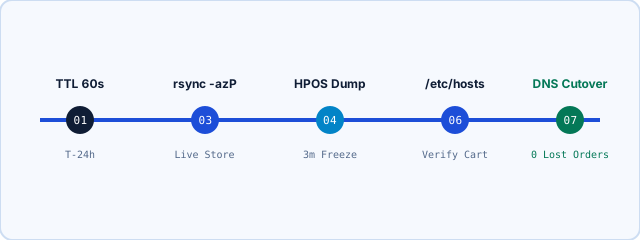
Twenty-four hours before cutover, drop your root (@) and www A/AAAA record TTL from 3600s down to 60s (or keep Cloudflare DNS-only ready) and pre-provision Let’s Encrypt SSL on the new LiteSpeed/KVM node so HTTPS handshakes never stall.
# Verify lowered TTL propagation across public resolvers before starting cutover
dig +nocmd store.yourdomain.tld A +noall +answer
# Expected TTL column <= 300 seconds:
# store.yourdomain.tld.  60  IN  A  203.0.113.10
-
Confirm High-Performance Order Storage (`wp_wc_orders`) sync has zero pending rows, drain queued ActionScheduler payment webhooks, and announce a 3-to-5 minute checkout maintenance pause right before the final SQL delta.
# Check WooCommerce HPOS status & drain pending ActionScheduler hooks via WP-CLI
wp wc hpos status --allow-root
wp action-scheduler run --hooks=woocommerce_deliver_webhook_async --allow-root
-
Run an initial `rsync -azP` while the source store is still serving shoppers to copy gigabytes of product imagery, then execute a second rapid delta `rsync --delete` during the brief order-lock window in under 15 seconds.
# Pass 1 (store live) + Pass 2 (final 15-second delta during order-lock window)
rsync -azP -e "ssh -p 22" /var/www/html/wp-content/ deploy@198.51.100.42:/var/www/html/wp-content/
rsync -azP --delete -e "ssh -p 22" /var/www/html/wp-content/uploads/ deploy@198.51.100.42:/var/www/html/wp-content/uploads/
-
Stream a consistent InnoDB snapshot using `--single-transaction --quick` so read tables never hard-lock, compress with zstd/gzip over SSH, and import directly into your tuned MariaDB 10.11 buffer pool.
# Consistent InnoDB snapshot streamed directly into target MariaDB 10.11
mysqldump --single-transaction --quick --routines --triggers wc_prod_db \
  | zstd -3 | ssh deploy@198.51.100.42 "zstd -d | mysql wc_prod_db"
-
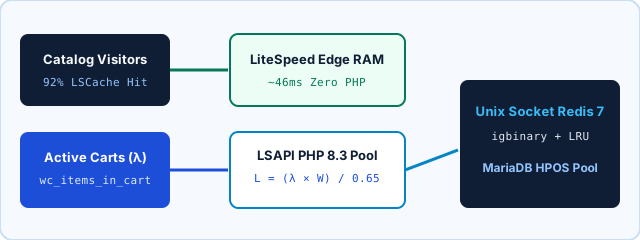
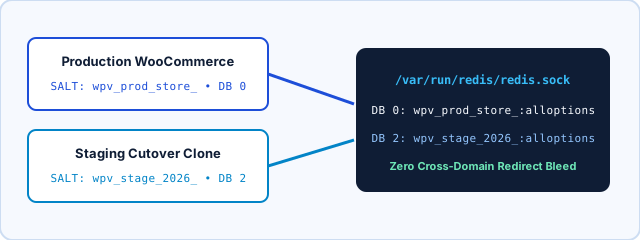
Configure `wp-config.php` on the new host with a unique `WP_CACHE_KEY_SALT`, Unix domain socket `/var/run/redis/redis.sock`, `igbinary` compression, and `DISABLE_WP_CRON` before warming object cache.
define('WP_CACHE_KEY_SALT', 'wpv_live_cutover_2026_');
define('WP_REDIS_SCHEME', 'unix');
define('WP_REDIS_PATH', '/var/run/redis/redis.sock');
define('WP_REDIS_IGBINARY', true);
define('DISABLE_WP_CRON', true);
-
Never switch public DNS blind! Override your workstation `/etc/hosts` (or run `curl --resolve`) against the new LiteSpeed/KVM IP to confirm `x-litespeed-cache: hit` on catalog URLs and clean HTTP 200 responses on `?wc-ajax=get_refreshed_fragments`.
# Probe new server TLS + LSCache hit without touching public DNS yet
curl -I --resolve store.yourdomain.tld:443:198.51.100.42 https://store.yourdomain.tld/
curl -s -o /dev/null -w "%{http_code}\n" --resolve store.yourdomain.tld:443:198.51.100.42 \
  "https://store.yourdomain.tld/?wc-ajax=get_refreshed_fragments"
-
Point your public DNS A/AAAA record to the new IP, lift maintenance mode on the target node (keeping old node read-only as a safety net), strip `fbclid,gclid,ttclid` from LSCache keys, and enable the 60-second systemd ActionScheduler timer.
# Enable systemd WP-CLI cron runner & verify LSCache ad-parameter rule
sudo systemctl enable --now wp-action-scheduler.timer
wp litespeed-purge all --allow-root